Rental Unit Interior Upgrade Rent Premium ROI Calculator in Excel: The Answer Depends on What You Tear Out
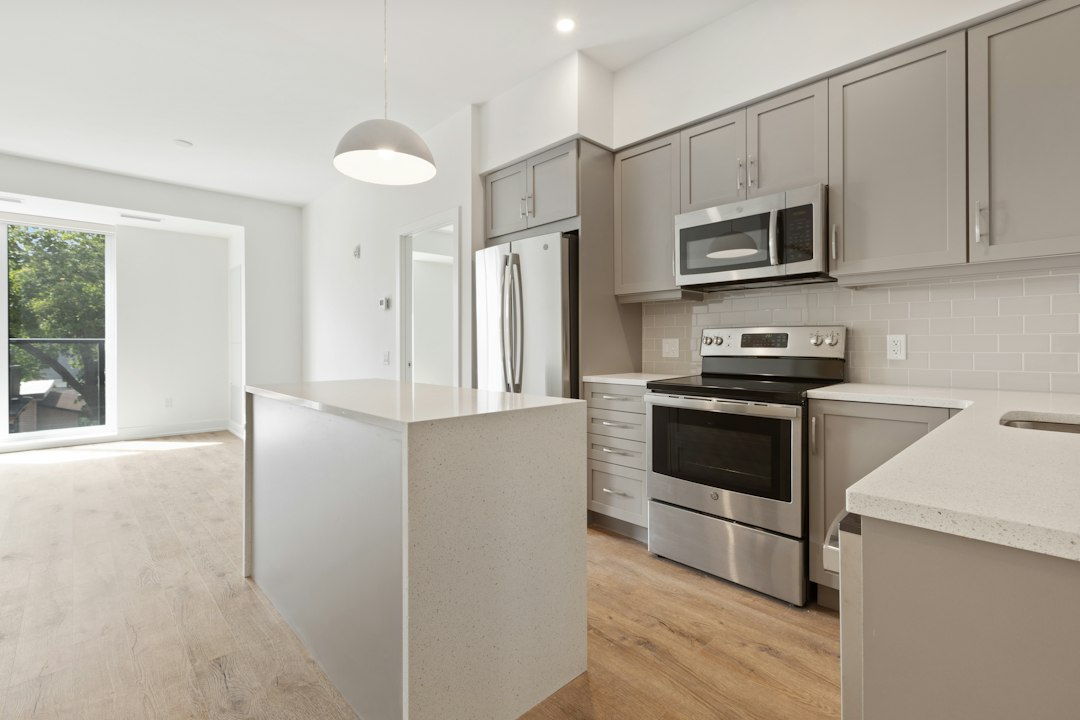
The tenant in Unit 3 of your fourplex gives notice. She paid $1,250 a month. Your contractor quotes $6,000 to put in vinyl plank flooring, a stainless appliance set and a quartz countertop, and the renovated two-bedrooms down the street list at $1,445. That reads as $195 a month for $6,000, paid back in under three years. A rental unit interior upgrade rent premium ROI calculator in Excel exists to take that number apart before you sign the bid, because most of the $195 has nothing to do with the upgrade, most of the $6,000 is money the turnover was going to cost you anyway, and the same job in a different unit of the same building returns a fraction of it.
This article builds the calculator on one fourplex, runs two units through it, and ends with a rule for which upgrades to buy at which turnover. All rents, bids and comps below are example figures for a mid-priced market. The useful lives come from published tables, cited where they are used.
The $195 that is really $95
Unit 3's tenant moved in five years ago and her rent went up less than the market did. An unrenovated two-bedroom on the same block rents for $1,350 today. The first $100 of the jump to $1,445 comes from re-letting at market, and you get it with a can of paint and a cleaning crew. That gap is loss to lease, and the rental property loss to lease calculator covers how to measure it across a whole rent roll. Credit it to the kitchen and every upgrade you ever make will look twice as good as it is.
The unit renovation rent premium is the difference between renovated and unrenovated comps that match on everything else: bedrooms, baths, laundry, parking, school zone. Pull them the way the multifamily rent comp survey spreadsheet does, and split them into three groups instead of two, so the flooring and the kitchen each get their own number.
| Comp group | Asking rents | Median | Premium over unrenovated |
|---|---|---|---|
| Unrenovated (carpet, white appliances, laminate top) | $1,295, $1,325, $1,340, $1,360, $1,375, $1,410 | $1,350 | $0 |
| Hard floors, original kitchen | $1,385, $1,400, $1,425 | $1,400 | $50 |
| Hard floors, stainless, stone top | $1,425, $1,440, $1,450, $1,475 | $1,445 | $95 |
The comp tab computes each premium as a difference of medians, =MEDIAN(C12:C14)-MEDIAN(C4:C9) for flooring and =MEDIAN(C17:C20)-MEDIAN(C12:C14) for the kitchen. Medians matter with six comps: one overpriced listing that sits for two months moves an average and barely touches a median. The result is $50 for the floors and $45 for the kitchen. More than half of the premium comes from the cheapest third of the job.
Four paybacks for one $6,000 job
The usual test is rent premium payback: cost divided by extra rent. On the same job it gives four different answers depending on what you put in the formula.
| Method | Cost | Annual benefit | Payback |
|---|---|---|---|
| Owner's version: new rent minus old rent | $6,000 | $195 × 12 = $2,340 | 2.6 years |
| Upgrade premium only, full occupancy | $6,000 | $95 × 12 = $1,140 | 5.3 years |
| Premium at 95% occupancy, plus 7 extra vacant days | $6,310.68 | $1,083 | 5.8 years |
| Same, net of the carpet and appliances the turn required anyway | $2,910.68 | $1,083 | 2.7 years |
The third line adds the cost of time. A stone top needs a template visit, fabrication and a plumber to reconnect the sink, so the kitchen keeps the unit off the market about a week longer than a standard make-ready (an example figure; ask your fabricator for theirs). At $1,350 a month, the rent you would have collected is =B4*12/365, or $44.38 a day, and seven days cost $310.68. The 95 percent occupancy is an assumption for the example; use your own vacancy history.
The fourth line is the one most owners never compute. Unit 3's carpet is worn through and its white appliances are fourteen years old, with a refrigerator that runs all night. A plain make-ready would have replaced them with $1,500 of new carpet and a $1,900 white appliance set. Only $2,600 of the $6,000 is upgrade.
Payback has a second flaw: it ignores how long each piece lasts. A carpet that has to be replaced in six years and a countertop that lasts fifty both show up as dollars spent once. Carpet at $1,500 every six years costs more per year than vinyl plank at $1,800 every fifteen.
Price each component by the year, not the job
Turn each cost into what it costs per year of service, then compare that with what it earns per year. Excel does this with one function: =PMT(Inputs!$B$1,D5,-B5) spreads the cost in B5 over the life in D5 at the cost of money in Inputs!B1, the same way a lender would amortize it. This is the equivalent annual cost. The example uses 8 percent, an assumed rate for whatever money funds the job (a HELOC, reserves you could otherwise invest); put your own in Inputs!B1.
The lives come from the Estimated Useful Life table HUD publishes for its Capital Needs Assessment e-Tool, in the Interiors, Dwelling Units section, family column. The table says to put any item it does not list in the closest category, so vinyl plank goes under "Resilient tile or sheet floor (vinyl, linoleum)".
| Component | HUD life (years) | Upgrade cost | Upgrade cost per year | Required item cost | Required item per year |
|---|---|---|---|---|---|
| Vinyl plank flooring | 15 | $1,800 | $210.29 | Carpet, $1,500 (6 yr) | $324.47 |
| Refrigerator | 12 | $1,050 | $139.33 | $800 | $106.16 |
| Range | 15 | $700 | $81.78 | $550 | $64.26 |
| Dishwasher | 10 | $500 | $74.51 | $350 | $52.16 |
| Microwave | 10 | $350 | $52.16 | $200 | $29.81 |
| Quartz top and sink, plus $310.68 downtime | 50 (engineered stone) | $1,910.68 | $156.18 | Keep laminate | $0 |
The first row upends the usual view of flooring. Carpet costs $324.47 a year because it only lasts six years. Vinyl plank costs $210.29 a year because it lasts fifteen. The floor that rents for $50 more is also the cheaper floor to own. In column H, =F5-G5 gives its net cost per year, here a negative $114.18, so the plank is cheaper to own than carpet before the tenant pays a cent of premium.
Rental flooring useful life is where published sources disagree most, so check a second one before you trust the result. Fannie Mae's 2014 useful life table for multifamily property condition assessments (Form 4099.F, Multifamily/Coop column) is less generous to vinyl: 10 years for resilient flooring and 7 for carpet. On those lives, plank costs =PMT(8%,10,-1800), or $268.25 a year, and carpet $288.11. The ranking holds.
The kitchen's appliance lines work the same way: stainless costs $95.41 a year more than the white set the turn needed anyway. The countertop is the only line with no offset, because a fourteen-year-old laminate top is still usable, and the downtime goes on this line because the fabrication causes it.
What you tear out decides the answer
Now take Unit 1 in the same building. It turned over three years ago and got new carpet and a new white appliance set at the time. Same floor plan, same $6,000 bid, same $95 premium. The difference is that nothing in Unit 1 needs replacing, so every line of the bid is pure upgrade and the required-item column is zero.
The annual benefit is the premium times twelve times occupancy, =FloorPremium*12*Inputs!$B$2 (and the same with the kitchen premium): $570 for the floors and $513 for the kitchen. Subtract the net cost per year and you get the number that decides.
| Per year | Unit 3 (worn out) | Unit 1 (3 years old) |
|---|---|---|
| Flooring benefit | $570.00 | $570.00 |
| Flooring net cost | -$114.18 | $210.29 |
| Flooring net return | $684.18 | $359.71 |
| Kitchen benefit | $513.00 | $513.00 |
| Kitchen net cost | $251.59 | $503.97 |
| Kitchen net return | $261.41 | $9.03 |
| Package net return | $945.59 | $368.74 |
Unit 1's kitchen nets $9.03 a year on a $4,510.68 outlay counting the downtime. That is break-even dressed up as an investment. Unit 1's numbers are, if anything, kind to the kitchen: they charge nothing for the three-year-old white set you would remove, which still has seven to twelve years of life left by the HUD table unless you can move it into another unit.
Flooring passes in both units. The kitchen passes comfortably only where the old one is already dead. Same bid and same premium in both units: the age of what you rip out sets the return. A rental property capital reserve calculator already lists each component with its age and remaining life, so the same grid tells you which units are due a kitchen.
The premium does not last as long as the quartz
The HUD lives are physical lives. A quartz top lasts fifty years, but the rent premium only lasts while the unit still looks renovated next to the comps, and the comps get renovated too. Nobody publishes how long that takes, so the sheet treats it as an input. In B3, enter the number of years you expect the premium to last, and cap every component at it with =PMT(Inputs!$B$1,MIN(D5,Inputs!$B$3),-B5).
The other way to read the same model is the break-even premium: the monthly rent increase that would make the kitchen exactly pay for itself, =SUM(H6:H10)/(12*Inputs!$B$2). Compare it with the $45 your comps support.
| Kitchen | Premium lasts full physical life | Premium lasts 8 years |
|---|---|---|
| Unit 3 net cost per year | $251.59 | $454.30 |
| Unit 3 break-even premium | $22.07/mo | $39.85/mo |
| Unit 3 net return | $261.41 | $58.70 |
| Unit 1 net cost per year | $503.97 | $784.93 |
| Unit 1 break-even premium | $44.21/mo | $68.85/mo |
| Unit 1 net return | $9.03 | -$271.93 |
If the kitchen premium fades in eight years, Unit 1 loses $271.93 a year on it, and would need $68.85 a month to break even against comps that support $45. Unit 3 still clears it with $5.15 a month to spare. Flooring survives the same test in both units: capped at eight years, plank costs $313.23 a year, so Unit 1 still nets $256.77 and Unit 3 nets $581.25.
If your market is one where every landlord renovated in the same two years, use a short horizon. If renovated stock is scarce and new construction rents far above you, a longer one is defensible. Write the reason next to B3, because that cell moves the answer more than any bid.
Building the sheet
Three tabs carry the whole decision. Keep inputs in one place so the second unit is a copy of the first with four numbers changed.
Inputs tab
- B1, cost of money: 8%.
- B2, occupancy: 95%.
- B3, years the premium lasts: blank for physical life, or 8 for the fade test. MIN ignores an empty cell, so with B3 blank
MIN(D5,Inputs!$B$3)simply returns the physical life. - B4, unrenovated market rent: $1,350.
- B5, extra vacant days the upgrade adds: 7.
- B6, downtime cost:
=B4*12/365*B5, which returns $310.68.
Comps tab
Three blocks of rents, one per comp group, each with a median and a premium line. Add a column for days on market. A renovated comp that has been listed for 60 days is telling you its rent is too high, and leaving it in inflates the premium you are about to pay for.
Components tab
One row per component, starting in row 5: A name, B upgrade cost, C cost of the item the turn requires anyway (zero if the existing one is fine), D upgrade life, E required item life, F upgrade cost per year =PMT(Inputs!$B$1,D5,-B5), G required item per year =IF(C5=0,0,PMT(Inputs!$B$1,E5,-C5)), H net cost =F5-G5. Put the downtime from Inputs!B6 into the cost of the component that causes it. Below the rows, the verdict per group, shown here for the kitchen in rows 6 to 10 (flooring is row 5 alone):
- Benefit:
=Premium*12*Inputs!$B$2 - Net return:
=Benefit-SUM(H6:H10) - Decision:
=IF(NetReturn>0,"DO IT","WAIT FOR END OF LIFE") - Payback, kept only for the lender's question:
=IF(Benefit<=0,"NEVER",SUM(B6:B10)/Benefit)
The guard on the payback matters for the same reason it does in the rental property submetering payback calculator: a negative benefit divided into a cost returns a negative payback, which reads like a fast one.
Two checks before you trust the output. Total the upgrade cost column and compare it with the contractor's bid; they must match to the dollar, downtime excluded. Then set Inputs!B1 to 0% and confirm each cost per year equals cost divided by life, which proves the PMT inputs are in the right order. Turnover labor, cleaning and repairs that happen in every scenario stay out of this sheet entirely; they belong in the rental property turnover cost calculator, because they do not change between options.
The call for this turnover
In Unit 3, do the whole package. The carpet and appliances had to go anyway, so the real upgrade is $2,600 plus a week of rent, and it returns $945.59 a year with the kitchen still positive if its premium fades in eight years. Sign the bid, but book the rent increase in your projections at $95, not $195, because the other $100 was loss to lease you would have captured with a standard make-ready.
In Unit 1, put in the vinyl plank at this turnover and leave the kitchen. The floors return $359.71 a year even with nothing to replace. The kitchen returns $9.03 at best and loses money if the premium fades, because you would be paying full price to replace three-year-old appliances. Note the install dates of Unit 1's appliances and plan the kitchen for the turnover where they reach the end of their life, when the stainless set costs you only its $700 difference over the white one you would buy anyway.
The SheetCraft Rental Property Analyzer is where this decision lands at the building level. Its deal summary takes the rent, vacancy and maintenance reserve, and its side-by-side view compares up to five properties with identical metrics, so you can enter the same building three times, at today's rents, with Unit 3 renovated, and with both units renovated, and see what each does to cash flow, cash-on-cash return and the ten-year projection. It does not hold a useful life table or price components by the year: build the Components tab above next to it, and carry each unit's verdict and premium into the scenario you compare.
Related template
Rental Property Analyzer
Analyze any rental deal in 15 minutes — not 3 hours in a messy spreadsheet. Cash flow, cap rate, cash-on-cash return, and 10-year projections. All automated.
Get the Template — $49